You can integrate MongoDB Atlas with LangGraph to build AI agents. This tutorial demonstrates how to build an AI agent that answers questions about sample data in MongoDB.
Specifically, the agent uses the integration to implement agentic RAG and agent memory. It uses semantic search and full-text search tools to retrieve relevant information and answer questions about the data. It also implements both short and long-term memory using MongoDB by storing conversation history and important interactions in separate collections.
Prerequisites
To complete this tutorial, you must have the following:
One of the following MongoDB cluster types:
An Atlas cluster running MongoDB version 6.0.11, 7.0.2, or later. Ensure that your IP address is included in your Atlas project's access list.
A local Atlas deployment created using Python and Docker. Install
atlas-local-lib-py(pip install atlas-local-lib-py) to programmatically create and manage local deployments. To learn more, see the atlas-local-lib-py repository.A MongoDB Community cluster with Search and Vector Search installed.
A Voyage AI API key. To learn more, see API Key and Python Client.
An OpenAI API Key. You must have an OpenAI account with credits available for API requests. To learn more about registering an OpenAI account, see the OpenAI API website.
Note
Check the requirements of the langchain-voyageai package to ensure you're using a compatible Python version.
Set Up the Environment
To set up the environment, complete the following steps:
Initialize the project and install dependencies.
Create a new project directory, then install the required dependencies:
mkdir langgraph-mongodb-ai-agent cd langgraph-mongodb-ai-agent pip install --quiet --upgrade python-dotenv langgraph "langgraph-checkpoint-mongodb>=0.5.0" "langgraph-store-mongodb>=0.3.0" langchain langchain-mongodb langchain-voyageai langchain-openai pymongo
Note
Your project will use the following structure:
langgraph-mongodb-ai-agent ├── .env ├── config.py ├── search-tools.py ├── memory-tools.py ├── agent.py ├── main.py
Set environment variables.
Create a .env file in your project and specify the following variables. Replace the placeholder values with valid API keys and your MongoDB cluster's connection string.
VOYAGE_API_KEY = "<voyage-api-key>" OPENAI_API_KEY = "<openai-api-key>" MONGODB_URI = "<connection-string>"
Note
Replace <connection-string> with the connection string for your Atlas cluster or local Atlas deployment.
Your connection string should use the following format:
mongodb+srv://<db_username>:<db_password>@<clusterName>.<hostname>.mongodb.net
IMPORTANT: Ensure that your connection string includes your database user's credentials. To learn more about finding your connection string, see Connect to a Cluster via Client Libraries.
Your connection string should use the following format:
mongodb://localhost:<port-number>/?directConnection=true
To learn more, see Connection Strings.
Use MongoDB as a Vector Database
To configure MongoDB as a vector database for storage and retrieval, complete the following steps:
Load the sample data.
For this tutorial, you use one of our sample datasets as the data source. If you haven't already, complete the steps to load sample data into your Atlas cluster.
Specifically, you will use the embedded_movies dataset, which contains documents about movies, including the vector embeddings of their plots.
Note
If you want to use your own data, see LangChain Get Started or How to Create Vector Embeddings Manually to learn how to ingest vector embeddings into Atlas.
Define Search Tools
Create a search_tools.py file in your project. In this file, you define the search tools that the agent uses to perform agentic RAG.
Note
You can define any tool that you need to perform a specific task. You can also define tools for other retrieval methods, such as hybrid search or parent-document retrieval.
Define Memory Tools
Create a memory_tools.py file in your project. In this file, you define the tools that the agent can use to store and retrieve important interactions across sessions to implement long-term memory.
Build the Agent with Persistence
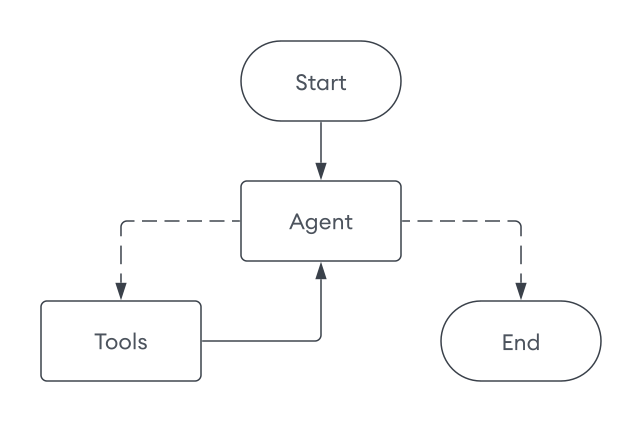
Create a agent.py file in your project. In this file, you build the graph that orchestrates the agent's workflow. This agent uses the MongoDB Checkpointer component to implement short-term memory, allowing for multiple concurrent conversations with separate histories.
The agent uses the following workflow to respond to queries:
Start: The agent receives a user query.
Agent Node: The tool-bound LLM analyzes the query and determines if tools are needed.
Tools Node (if needed): Executes the appropriate search or memory tools.
End: The LLM generates a final response using the output from the tools.
Tip
To learn more about persistence, short-term memory, and the MongoDB checkpointer, see the following resources:
Run the Agent
Finally, create a file named main.py in your project. This file runs the agent and allows you to interact with it.
Save your project, then run the following command. When you run the agent:
The agent initializes the vector store and creates the indexes if they don't already exist.
You can enter a session ID to start a new session or continue an existing session. Each session is persisted and you can always resume a previous conversation.
Ask questions about movies. The agent generates a response based on your tools and previous interactions.
The following output demonstrates a sample interaction:
python main.py
Creating vector search index... Vector search index created successfully! Creating search index... Search index created successfully! Enter a session ID: 123 Ask me about movies! Type 'quit' to exit. Your query: What are some movies that take place in the ocean? 🔧 Agent chose to use tool(s): plot_search → Executing plot_search Answer: Here are some movies that take place in the ocean: 1. **20,000 Leagues Under the Sea** - A marine biologist, his daughter, and a mysterious Captain Nemo explore the ocean aboard an incredible submarine. 2. **Deep Rising** - A group of armed hijackers board a luxury ocean liner in the South Pacific Ocean, only to fight man-eating, tentacled sea creatures. ... (truncated) Your query: What is the plot of the Titanic? 🔧 Agent chose to use tool(s): title_search → Executing title_search Answer: The plot of *Titanic* involves the romantic entanglements of two couples aboard the doomed ship's maiden voyage ... (truncated) Your query: What movies are like the movie I just mentioned? 🔧 Agent chose to use tool(s): plot_search → Executing plot_search Answer: Here are some movies similar to *Titanic*: 1. **The Poseidon Adventure** - A group of passengers struggles to survive when their ocean liner capsizes at sea. 2. **Pearl Harbor** - Focused on romance and friendship amidst the backdrop of a historical tragedy, following two best friends and their love lives during wartime. ... (truncated) Your query: I don't like sad movies. 🔧 Agent chose to use tool(s): save_memory → Executing save_memory Answer: Got it—I'll keep that in mind. Let me know if you'd like recommendations that focus more on uplifting or happy themes! (In different session) Enter a session ID: 456 Your query: Recommend me a movie based on what you know about me. 🔧 Agent chose to use tool(s): retrieve_memories → Executing retrieve_memories Answer: Based on what I know about you—you don't like sad movies—I'd recommend a fun, uplifting, or action-packed film. Would you be interested in a comedy, adventure, or family-friendly movie? Your query: Sure! 🔧 Agent chose to use tool(s): plot_search, plot_search, plot_search → Executing plot_search → Executing plot_search → Executing plot_search Answer: Here are some movie recommendations from various uplifting genres that suit your preferences: ### Comedy: 1. **Showtime** (2002): A spoof of buddy cop movies where two very different cops are forced to team up on a new reality-based TV cop show. It's packed with laughs and action! 2. **The Big Bus** (1976): A hilarious disaster film parody featuring a nuclear-powered bus going nonstop from New York to Denver, plagued by absurd disasters. ### Adventure: 1. **Journey to the Center of the Earth** (2008): A scientist, his nephew, and their mountain guide discover a fantastic and dangerous lost world at the earth's core. 2. **Jason and the Argonauts** (1963): One of the most legendary adventures in mythology, brought to life in this epic saga of good versus evil. ### Family-Friendly: 1. **The Incredibles** (2004): A family of undercover superheroes is forced into action to save the world while living in quiet suburban life. 2. **Mary Poppins** (1964): A magical nanny brings joy and transformation to a cold banker's unhappy family. 3. **Chitty Chitty Bang Bang** (1968): A whimsical adventure featuring an inventor, his magical car, and a rescue mission filled with fantasy.