Run AI agents for insurance from one interface, all acting on a shared context layer, with human controls for approval and auditing.
Use cases: Gen AI, Single View
Industries: Insurance
Products: MongoDB Atlas, MongoDB Node.js Driver, MongoDB Search
Solution Overview
Fragmented data and application context-switching waste time and create unnecessary cognitive strain for insurance teams.
Agentic AI transforms these workflows, but adoption requires clear audit trails showing what was decided and why. The Agentic Control Center unifies every agent and business record in one interface, giving you the tools to audit activity and manually edit data.
MongoDB Atlas stores both the context layer and application data. The Agentic Control Center logs chat histories and manual edits in a single collection. Because JSON is human-readable, summary generation is straightforward. Centralizing agent and business data helps you process claims quickly without sacrificing human judgment. To review a session, you can generate summaries from stored data or view raw logs in the audit view.
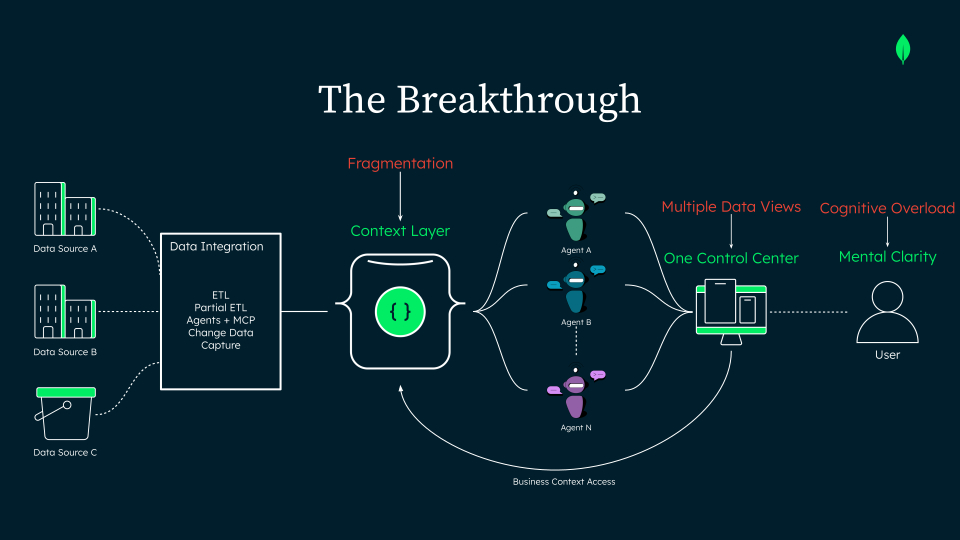
Figure 1. From Fragmentation to One Control Center
Reference Architectures
The solution consists of the following components:
MongoDB Atlas: Stores multi-schema log entries, application data, and the context layer in a single collection.
Next.js: Builds the interface and uses Server Actions and server-side API routes to prevent exposing agent credentials to the client.
LLM provider: Aggregates relevant logs and sends them to an LLM to generate structured session recaps for external stakeholders.
Agent platform: Runs agents and exposes them through APIs for application calls.
Key vault: Not implemented in this demo. In production, this component manages keys for field-level-encryption of stored agent credentials.
Talking to an agent
The client doesn't store agent credentials. Instead, the server routes the message, resolves credentials, and forwards the request to the agent platform. The response streams to the Next.js backend, which relays it to the client interface.
The app includes key features for regulated teams:
Server-side execution: The platform executes workflows, not the browser.
Human-in-the-loop controls: Certain actions require human review and approval. The agent stops execution, and the task run remains recoverable until you approve or reject it.
Access business data
You can work with business object data in two ways:
Chat panel: Perform complex tasks using natural language.
Dashboard: Manually edit data for straightforward tasks and corrections.
Agents use dedicated tools to access the same collections that the dashboard reads. The app logs both agent-assisted and manual changes so you can review them.
Audit and Summarize Activity
Every actor writes to a single shared log. Agent conversations, human approval actions, and manual record edits save to one collection. The app uses MongoDB's flexible document model to store logs with varied structures.
This single source of truth supports two types of reports:
Audit report: Displays raw agent logs without involving an external model. Use this to review the steps a specific agent took.
Summary: Sends all log types, including agent actions and manual changes, to an LLM to generate a short, structured, exportable document. Use this to share key session updates with external stakeholders and non-technical readers.
The control center unifies these features in one interface to streamline daily operations and ensure complete auditability.
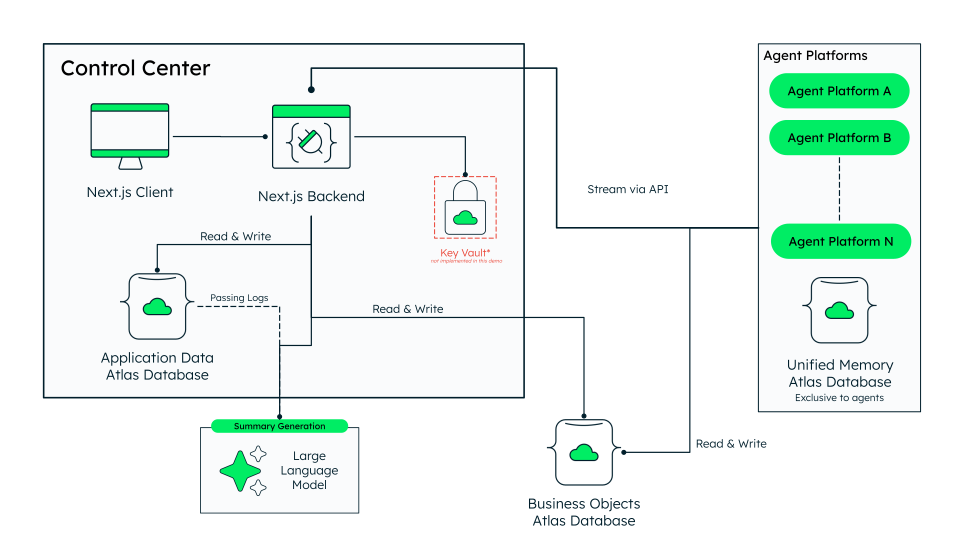
Figure 2. Reference architecture of the Agentic Control Center
Data Model Approach
A single collection stores three types of events: agent turns, human approvals, and manual record edits. Because MongoDB uses a flexible document model, each log document contains only the fields required for its event type, keeping log entries simple and lightweight.
{ "_id": { "$oid": "6a76077e73179f98864eafc3" }, "timestamp": { "$date": "2026-08-07T16:27:42.776Z" }, "agentId": "property-and-casualty", "sessionId": "454351fb-f8aa-44b0-a5d1-add3a70385f5", "userId": "bea53e1a-3360-4dcc-957d-fa94cbfde37c", "text": "## Active Policies\n\nI found **4 active policies** in the system:\n\n1. **PAP-IL-2024-0093821** ...", "query": "Show me all active policies.", "result": { "failed": false, "reason": null }, "agent_steps": [ { "text": "Thinking...", "at": { "$date": "2026-08-07T16:27:32.821Z" } }, { "text": "Calling tool: list_policies_by_status...", "at": { "$date": "2026-08-07T16:27:34.163Z" } }, { "text": "Thinking...", "at": { "$date": "2026-08-07T16:27:34.843Z" } } ] }
Build the Solution
Visit the Insurance Agentic Webapp GitHub Repository and follow the repository README for complete instructions.
Configure environment variables
Copy EXAMPLE.env to create your own .env file, then provide the following credentials:
The MongoDB connection string.
Database names for the app data and business object data.
Agent credentials (API key, project ID, workspace ID, and a custom agent ID).
LLM provider credentials (endpoint, model name, and API key).
Launch the app
Run npm run dev and open http://localhost:8080, or run make build to launch the app in Docker.
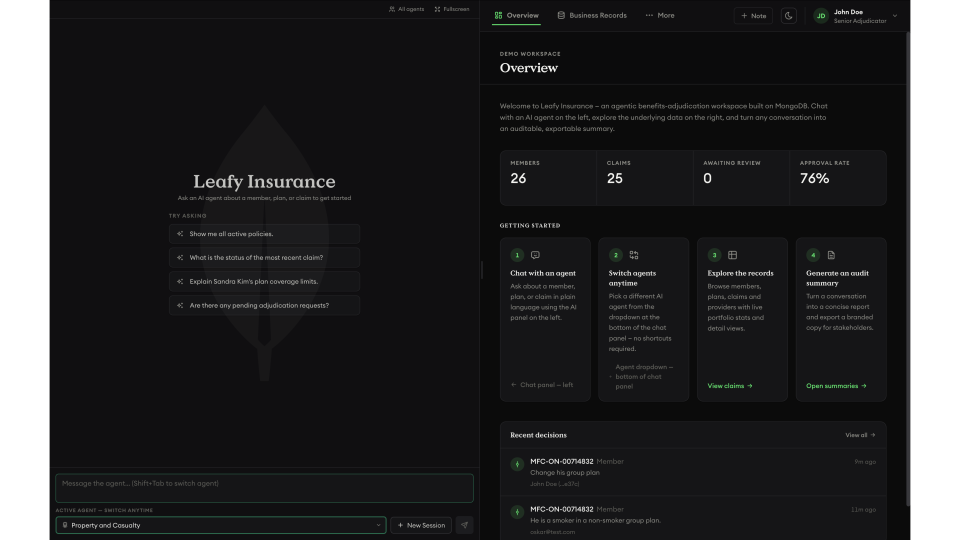
Figure 3. Screenshot of the application
Key Learnings
Log all activity in a single collection: Agent turns, human approvals, and manual edits save to one
logscollection. A single query returns the complete timeline, so you never need to join multiple data sources.Record reasons alongside changes: Requiring a reason for manual edits turns field updates into complete audit records, storing explanations alongside before and after values for compliance reviews.
Maintain human oversight for critical actions: Agents pause before executing high-stakes tasks and resume only after you approve them. The decision logs to the same collection as agent actions, preserving accountability across handoffs.
Share a unified context layer: Agents read from and write to a shared context layer instead of isolated copies. MongoDB stores multiple memory types, including episodic, short-term, and procedural, allowing agents to build on established history.
Authors
Oskar Kloczko, MongoDB
Albert Cortez, MongoDB
Daniel Jamir, MongoDB