MongoDB Atlas serves as the unified operational data layer for agentic Intent-Based Networking, enabling AI agents to autonomously configure, monitor, and repair complex networks in real time.
Use cases: Gen AI
Industries: Telecommunications
Products: MongoDB Atlas, MongoDB Search, MongoDB Atlas Vector Search, Voyage AI
Solution Overview
Telecommunications and media are among the industries that lead AI adoption, alongside software and fintech. Yet the gap between leaders and everyone else keeps widening: companies at the frontier of AI capability generate roughly double the revenue growth of their peers, while nearly three-quarters of all companies have yet to show any tangible value from their AI investments. Telecom races ahead on one front in particular — it has the highest rate of agentic AI adoption of any industry. The gap isn't the model. It's everything underneath that agents need to act on live network data:
Data pipelines
Vector search
Embeddings
Short-term and long-term memory
Real-time processing
Agentic network automation closes that gap. Instead of engineers translating requests into device configurations by hand, autonomous agents interpret goals, plan changes, act on the network, and verify the result. IBN is the clearest expression of this pattern. You state a network outcome in plain business terms, and the system delivers and defends it without further intervention.
With IBN, an operator's customer describes what they need, not how to build it. For example: Open a new flagship store. Give POS traffic priority, keep guest WiFi strictly separated, add a camera uplink, and hold POS latency under 40 ms.
A central agent translates that intent into network policies, provisions the services, and monitors them continuously. When the network drifts from the promise, the agent diagnoses the cause and applies a fix on its own.
MongoDB Atlas serves as the operational data layer driving this workflow. It consolidates every resource the agent needs in one database, delivering real-time queries across the current network state, customer agreements, event histories, and operator insights. The AI layer connects directly to the data, eliminating message bus, cache, or ETL pipelines. The Reference Architectures section shows how this framework works in detail.
Reference Architectures
The solution runs on a single agent backed by MongoDB Atlas. Figure 1 shows the main components:
A ReAct-based orchestrator
A two-stage semantic router
A set of specialized MCP microservices
Atlas collections storing the network's data and the agent's memory
Every service reads from and writes to Atlas, eliminating the need to maintain message bus, cache, or ETL pipelines. This foundation is extensible: the same orchestrator, router, and memory layer take on new domains by adding MCP services and collections. This framework sets the stage for future use cases such as a Digital Network Twin for what-if capacity planning.
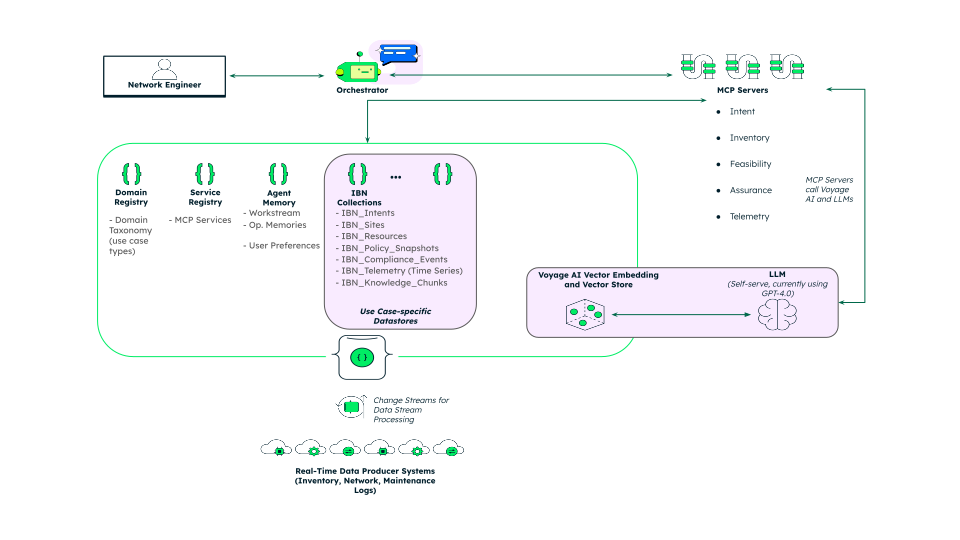
Figure 1. The orchestrator routes each query through MongoDB Atlas, which stores the service catalog, the IBN collections, and the agent’s memory.
Routing Queries to the Right Service
As the number of services grows, the agent needs a reliable way to pick the right one. Routing runs in two stages, both backed by MongoDB.
First, a small LLM classifies the query against a short taxonomy of domains, using a few lines per domain rather than per service. This framework keeps routing accurate as services multiply. Second, an Atlas $vectorSearch, filtered to the selected domain, retrieves the best-matching service. The service catalog lives in Atlas, and queries are routed through it.
The Intent Lifecycle
A network outcome intent passes through the following services from an initial request to a final resolution:
Intent service: Parses the natural-language request into structured fields with an LLM. It tracks the intent's state as it moves through submitted, feasible, planned, active, violated, and closed stages.
Inventory service: Holds the physical network, mapping sites with geospatial coordinates and the resources available at each location. When a site needs a spare device, it finds the nearest available one with a geospatial query.
Feasibility service: Matches the intent against the current inventory, builds a concrete service plan, and writes an immutable snapshot of that plan. Every change creates a new snapshot, so the full planning history stays auditable.
Assurance service: Monitors live telemetry against the agreed targets. When a metric breaches its threshold, it records a compliance event and pushes it to the dashboard in real time.
Telemetry simulator: Injects events on demand, so you can test the full violation, diagnosis, and remediation cycle in a controlled setting.
Diagnosis in a Single Query
Live violations create the most demanding moment. Suppose POS latency at the new store breaches its 40 ms target. Instead of opening a ticket, the assurance agent runs a single Atlas aggregation pipeline that applies specific filters against the knowledge base, creating a single diagnosis query against four dimensions:
Semantic similarity:
$vectorSearchfinds past incidents whose description is closest to the current violation, such as queue scheduling collision, strict guest segmentation active, link utilization low.Structured filter: limits results to past incidents, so runbooks and policy templates do not dilute the match.
Time window: excludes incidents older than 180 days, so conclusions from earlier network states do not mislead the results.
Geospatial bounds: keep the search local, so an incident in one city does not skew a diagnosis in another.
These operations run as pre-filters inside the Atlas Vector Search index, narrowing the candidate set before the similarity calculation runs. Responses return the closest past incident, its root cause, and its proven runbook together. The agent applies the runbook, records a recovery event, and the dashboard turns green. One pipeline in Atlas replaces multiple coordinated query passes across separate systems.
Data Model Approach
IBN works with different data shapes, and MongoDB Atlas holds them all in one place. Each of the following collections maps to a part of the workflow:
ibn_intents: Stores the parsed intent and its lifecycle state. It contains every field specified in the request, such as the latency ceiling or the segmentation policy.ibn_sites: Contains the network sites with 2dsphere-indexed coordinates for geospatial lookups.ibn_resources: Contains the network resources available at each site.ibn_policy_snapshots: Stores immutable plan snapshots that preserve the full planning history.ibn_telemetry. Stores metric samples in a time series collection.ibn_compliance_events: Stores the record of every violation and recovery.ibn_knowledge_chunks: Stores past incidents, runbooks, and templates, auto-embedded with Voyage AI for vector search.
The agent's memory also lives in MongoDB, stored in dedicated collections alongside the network data:
agent_workstreams: Stores short-term context for the current work thread.agent_memories: Extracts long-term facts when a workstream closes, vector-indexed for recall across sessions.user_preferences: Stores instructions the engineer teaches the agent.
A single Atlas Vector Search index makes the four-dimensional diagnosis query possible. With Atlas auto-embedding, you point the index at a text field and Atlas generates and stores the embeddings for you. You don’t need a separate embedding pipeline or service to run. That same index pairs the auto-embedded text field with structured, time, and geospatial filters. As a result, a $vectorSearch stage does the work of several query engines:
{ "fields": [ { "type": "autoEmbed", "modality": "text", "path": "text", "quantization": "float", "model": "voyage-4" }, { "type": "filter", "path": "kind" }, { "type": "filter", "path": "segment" }, { "type": "filter", "path": "market" }, { "type": "filter", "path": "plan_id" }, { "type": "filter", "path": "ts" }, { "type": "filter", "path": "lng" }, { "type": "filter", "path": "lat" } ] }
Build the Solution
The full demo is available on this GitHub repository. Clone the repository, then follow these steps.
Set your API keys
Set the environment variables for the external services the demo calls:
OpenAI for the language model
MongoDB Atlas for the data layer
Voyage AI for embeddings
export OPENAI_API_KEY="<your openai api token>" export MONGODB_URI="<your mdb connection string>" export VOYAGE_API_KEY="<your voyage api token>"
Set up your Python environment
Install Python 3.13 and add it to your path. Then, create and activate a virtual environment. Finally, install the dependencies.
brew install python@3.13 export PATH="$(brew --prefix)/opt/python@3.13/libexec/bin:$PATH" python -m venv <dir> source <dir>/bin/activate cd agentic-mcp-demo pip install -r requirements.txt
Run the agent and watch it live
Start the web servers and point your browser to http://localhost:8070/ for the interactive shell.
./bin/start.sh
Buttons at the top navigation allow you to:
Feed seed data into the MongoDB collections.
Reset the data for re-doing the demo.
Open another browser window to display the IBN dashboard.
See the live state of the monitored sites in real time.
Try a full intent lifecycle
From the chat in the browser, walk the agent through a complete intent, from request to recovery. The diagnose violation prompt fires the four-dimensional diagnosis query.
-I'm opening a new Alpenmarkt store at Marienplatz Munich. POS priority, guest WiFi strictly separated, camera uplink, online by 18:00, max 40ms POS latency, 99.95% availability -feasibility check -propose and activate -inject morning rush -diagnose violation -apply runbook
Key Learnings
Unify your data in one store: Keep intent records, geospatial sites, time series telemetry, and vector-indexed knowledge in a single MongoDB Atlas database, queryable with one driver and one pipeline.
Retrieve across dimensions in one query: Combine vector similarity, structured filters, a time window, and geospatial bounds in a single Atlas Vector Search stage, with no application-side orchestration.
Stream real-time changes: Use MongoDB Change Streams to push intent activations, violations, and recoveries to dashboards without polling.
Give your agent a memory: Store short-term context, long-term facts, and user preferences as collections, so the agent improves with use rather than retraining.
Automate the full intent lifecycle: Let one agent parse, plan, activate, assure, and remediate network intents end to end, grounded in live data.
Authors
Benjamin Lorenz, MongoDB
Aditya Vikram Roy, MongoDB
Diego Canales, MongoDB